 Click to zoom
What is Cursor’s Visual Editor and why it matters
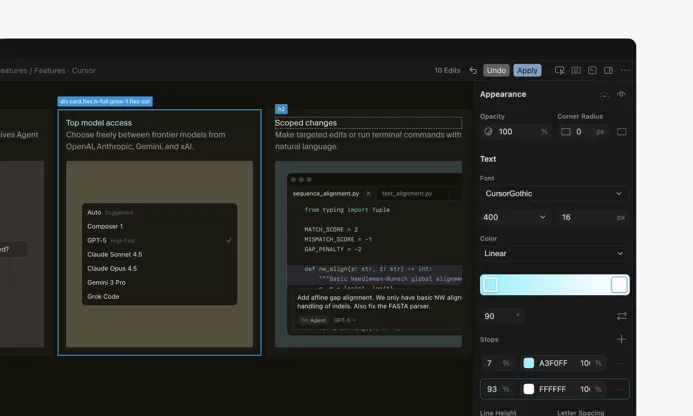
Cursor shipped Visual Editor to solve a problem I’ve watched teams trip over for years: design intent that gets lost somewhere between Figma and a codebase. In plain terms, it’s an AI web design tool that blends professional visual controls (fonts, spacing, components) with a natural-language design editor — so you can either tweak a slider or type, “Make this CTA warmer and bolder,” and the system applies that change straight into the project’s code.
How does Visual Editor work?
In practice, Cursor shows a two-pane layout: on one side, a visual design panel with all the familiar knobs; on the other, a chat interface where you speak to an AI UI agent. The agent parses your instruction, updates the live preview in Cursor’s integrated browser, and writes production-ready HTML/CSS (and sometimes JS) edits back to the repository. That means less guessing for engineers and fewer pixel-polish cycles for designers.
Key features
- Fine-grained visual controls: Real design options for typography, spacing, buttons and menus — the kind that respects design tokens and component libraries.
- Natural language editing: Ask the AI to make layout or style changes in plain English and get code-first design output.
- Live preview & integrated browser: Test interactions and use developer tools without switching contexts — helpful when you want to validate JS behavior as well as CSS.
- Code-first output: Edits map back to branches and pull requests so engineers see automated UI diffs and can review production-ready UI code generation.
Why companies care: reducing design-to-code friction
To be honest, the old hand-off model (Figma → ticket → dev) leaks time and intention. Visual Editor aims to collapse that loop: a designer’s words become concrete code changes, PMs can weigh in early, and engineers don’t reimplement styles from scratch. Teams attempting to reduce design-to-code friction with AI often cut days off simple marketing page iterations — real savings when launch windows are tight.
Where Visual Editor fits in Cursor’s roadmap
Cursor started as an AI-assisted front-end editing platform and has kept pushing inward: it built an in-house browser and begun deploying its own models to tighten the end-to-end experience. The result is a visual design + chat prompt interface that’s meant to broaden appeal beyond just developers — designers and cross-functional product teams can use it too — without losing the code-first mentality engineers demand.
Competitive landscape: who else is doing this?
Cursor isn’t alone. Big vendors and specialized rivals are racing toward similar territory — many teams are asking, “can AI edit my website styles directly in code?” Anthropic, OpenAI and Google are all expanding tooling that touches design-to-code conversion. Cursor’s edge is product-first execution: an integrated editor that ties live preview, automated UI diffs and PR workflows together so the change is visible and auditable. For context on the broader model and tooling race that influences these product moves, see ChatGPT Explained: The Complete 2025 Guide and how newer models drive agentic features.
Business signal: growth and funding
Cursor’s visible traction reflects interest in AI-powered UI editors among enterprises. They report sizeable customers and rapid ARR growth; that financial momentum matters because it funds features that large teams need — governance hooks, VCS integrations, and enterprise support for design tokens and version control. If you're tracking industry signal timing and model-driven product shifts, the monthly briefing on major breakthroughs is useful background: AI Bubble Fears Return as Wall Street Pulls Back.
Real-world example: a hypothetical team workflow
Here’s a scenario I’ve seen — or at least something very close. A SaaS marketing team needs a new hero for a campaign. Instead of filing a long ticket, the designer types: “Make hero font heavier, increase CTA size, use a teal gradient background and add microcopy under the CTA.” The agent applies the changes, creates a branch and opens a pull request with clear UI diffs and production-ready markup. An engineer reviews, runs automated checks, and merges. What used to be a multi-day dance becomes a single review cycle. For guidance on securing autonomous AI workflows and preventing unsafe changes in production, consult Agentic AI: The Next Major Cybersecurity Threat.
Pros and limitations
- Pros
- Saves time by removing manual hand-offs and duplicate work — especially for marketing pages and small UI changes.
- Improves style consistency with AI-driven style guidance when design tokens are wired in.
- Opens the UI to non-technical stakeholders who can drive iterative experiments quickly.
- Limitations & considerations
- Accuracy depends on how well the AI understands the project’s design system (and that’s a governance play).
- Large codebases need stricter review policies to avoid uncontrolled style drift — automated tests and token constraints are a must.
- Competition and model licensing may affect pricing or feature parity over time; evaluate total cost of ownership. For a sense of open-source alternatives and how they change cost dynamics, read about Nano Banana Pro and open-source model dynamics.
Security, governance and collaboration best practices
Treat AI-driven UI edits like any other code change: enforce code reviews, require CI checks, and map design tokens to variables that prevent ad-hoc styles. Integrate Cursor with git workflows (branches, pull requests) and surface automated UI diffs — that lets teams answer the common question, “how to integrate Cursor Visual Editor with git and PR workflows?” Also, set guardrails: who can approve AI-suggested edits, and what counts as an acceptable UI diff in production? For practical prompt and agent-control tips that help get reliable results from models powering these editors, check How Coding Agents Boost Developer Productivity.
Where to learn more (references and further reading)
- Anthropic’s Claude Code milestone: Anthropic
- Cursor’s Series D announcement and company blog: Cursor blog
- For broader context on how AI browsers and integrated browsing tools affect web tooling and preview experiences, see Stop Tabbing — Use Comet.
Final takeaways
Cursor’s Visual Editor is a practical AI-powered UI editor that moves teams closer to frictionless design-to-code workflows. It won’t replace designers or engineers — and honestly, you wouldn’t want it to — but it does speed collaboration and cut down iteration cycles when paired with disciplined governance: design systems, review processes and automated checks. If you’re wondering whether it’s suitable for enterprise design systems, the short answer is: yes, with the right token strategy and VCS controls.
Quick note: tools like this evolve quickly. My advice — run a short pilot (one marketing page or a small component library), measure cycle time, review friction and UI regressions, and then decide on a wider rollout.
Thanks for reading!
If you found this article helpful, share it with others